
REVIEW · NEW YORK CITY AUDIO TOURS
Brooklyn Bridge Self-guided Bike Tour App – Audio + Written
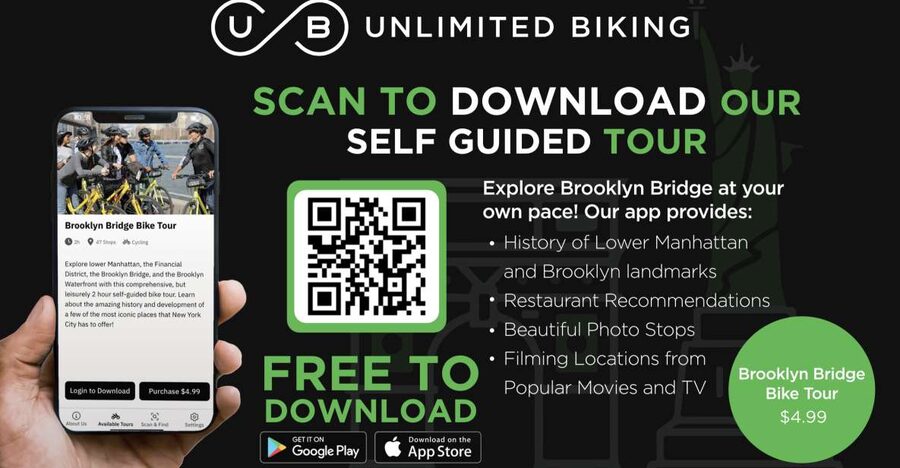
Start with the bridge, then follow your curiosity. This $5 app gives you audio and written stops through Lower Manhattan, across the Brooklyn Bridge, and into Brooklyn, so you can ride or walk without keeping up with a group. I like the freedom to pause for photos and food, and I like the practical map markers for restaurants and public restrooms. The main catch is that the bike is not included, and the app depends on your phone, location services, and a data plan.
You can activate the tour anytime within the booking period, then use it for 365 days. That is unusually generous for a sightseeing app, especially if your New York plans change or you want to split the route over more than one outing. Still, the product is non-refundable, so buy it only when you are fairly sure you will use it.
Key points before you set out
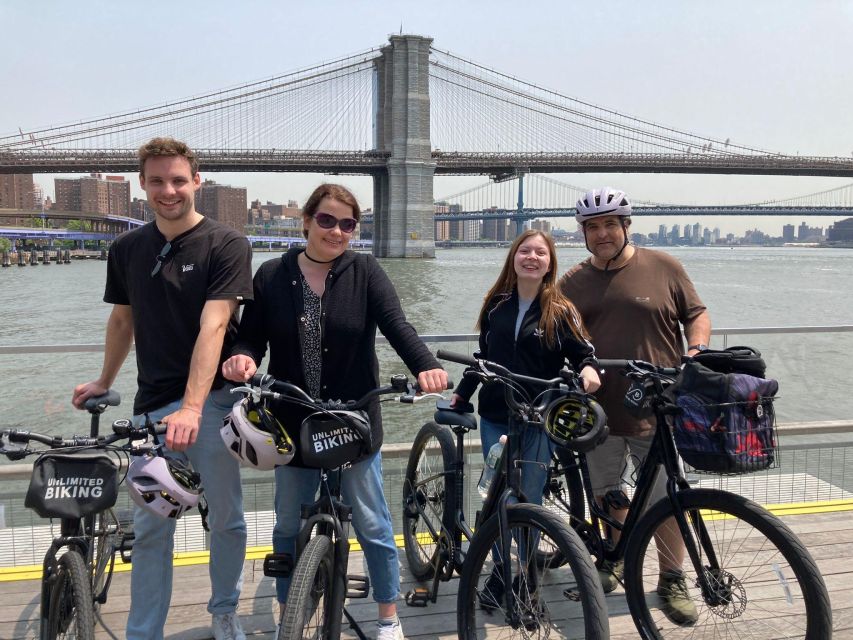
- One $5 purchase can cover your whole group: The code may be used by everyone with you on their own phones, so you do not need to buy one for each person.
- Start with your own bike, a rental, or your feet: The route works for cycling and walking, but bicycle hire, helmets, locks, and bike bags cost extra.
- The Woolworth Building is the walking starting point: If you bring your own bike or walk, you can begin there. Rental customers head to Unlimited Biking at 79 Chambers Street.
- The map lets you choose your focus: Follow the main route, or use separate markers for movie and television locations, photo spots, food, and restrooms.
- Audio and text suit different sightseeing styles: Listen while moving, or stop and read when you want more control.
- You have 365 days after activation: This is useful if you want to spread the route across several visits, though the purchase itself cannot be refunded.
What the $5 app actually gives you
This is not a guided bike ride with a person leading the way. It is a digital walking and cycling route inside the Unlimited Biking Tours app. You download the free app, enter the code supplied with your purchase, turn on location services, and use the map to find the stops.
At each marked location, you get a short explanation in written and audio form. The material covers notable places in Lower Manhattan and Brooklyn, along with history and fun facts. The app does not force you to follow one fixed pace. You can stop, skip a marker, return to one later, or leave the route for a meal.
That flexibility is the central reason to consider it. A standard group tour gives you a schedule and a human guide, but it also keeps you moving. Here, you can spend longer at a photo stop, wait for a better view, or pause your sightseeing when your legs need a break.
The tradeoff is just as clear. If you want lively conversation, personal stories, or help crossing a busy street, this app will not provide it. You are responsible for navigation, phone battery, traffic awareness, and deciding how long the route will take.
More Self-Guided Audio Tours in the USA
- NYC: St. Patrick’s Cathedral Official Self-Guided Audio Tour
★ 3.5 · 45 reviews - New York City’s Financial District: A Self-Guided Audio Tour
★ 4.5 · 8 reviews - New York City’s High Line: A Self-Guided Audio Tour
★ 5.0 · 4 reviews
Beginning at the Woolworth Building
If you are walking or bringing your own bicycle, the suggested start is the Woolworth Building. This gives you a practical entry into the Lower Manhattan portion of the route before you reach the Brooklyn Bridge.
The building is also a useful meeting point because the app can guide you from a known downtown location rather than leaving you to choose a random corner. Turn on your location services before you begin, then check the colored map so you understand which markers belong to the main route and which are optional.
If you need to rent a bicycle, you can arrange that separately and pick it up at Unlimited Biking, 79 Chambers Street. The rental is not part of the $5 app purchase. You also need to arrange your own helmet, bike bag, and bike lock unless those items come with the rental you select.
That separation between the app and the bicycle is important when you budget. The app is cheap, but your total cost depends on the bike rental, how many people need bikes, and any equipment fees. A person with a bicycle, or someone happy to walk, gets the strongest value.
Lower Manhattan stops and city context

The Lower Manhattan section gives you the setting for the bridge crossing. Rather than simply pointing you toward the bridge, the route places notable downtown locations into a larger story, with short explanations and fun facts at each stop.
I like this format for a first visit because it helps you connect separate sights. You are not just checking off a bridge crossing. You can use the audio to learn as you move, then read the text when you want to study a stop or confirm what you just heard.
The route also includes television and movie locations. These markers add a lighter layer to the tour. If you know a particular film or show connected to New York, the chance to identify a recognizable setting can make an ordinary-looking street more interesting.
The limits are worth noting. The supplied information does not promise a specific number of stops or a detailed description of every location. You should think of the app as a flexible guide to selected highlights, not as a full city tour covering every important building in downtown Manhattan.
Crossing the Brooklyn Bridge by bike or on foot
The bridge is the main reason most people will choose this experience. You can cross on a bicycle or walk the route, using the location-based markers to learn as you go.
On a bike, the bridge becomes part of a longer outing rather than a single photo stop. You can make your way from Lower Manhattan toward Brooklyn, pause for views, and continue to the marked locations on the other side. On foot, you have more time to stop and take pictures, but you will need to plan for a slower outing.
The app does not include a guide to manage bridge traffic or direct you through crowded areas. Keep your attention on the path and other people, especially when you stop for a photo or check your phone. The app is most useful when you look at it before moving again rather than reading while riding.
The photo markers are a nice touch. They point you toward places chosen for their visual appeal, giving you more than a simple list of historical facts. If taking pictures is a major reason for your outing, these locations can help you avoid wandering without a plan.
More Self-Guided Audio Tours in New York City:
- West Village’s Flappers, Freaks & Punks: A Self-Guided Audio Tour
★ 5.0 · 4 reviews - New York’s Iconic Central Park: A Self-Guided Audio Tour
★ 4.0 · 4 reviews - The Battery: A Self-Guided Audio Tour from Bowling Green Park to Stone St
★ 5.0 · 3 reviews - Boho Greenwich Village: A Self-Guided Audio Tour
★ 5.0 · 3 reviews
Exploring Brooklyn at your own speed
Once you reach Brooklyn, the app continues with notable locations, photo spots, food recommendations, and filming locations. This is where the self-guided format pays off. You can follow the route closely or use the map to decide which categories interest you most.
I would use the primary route first, then check the extra markers as your time and energy allow. The history stops give the outing structure. The photo markers give you reasons to linger. The food recommendations help turn the ride into a longer neighborhood visit instead of a quick bridge crossing.
You should keep your phone charged. Location-based apps are useful because they reduce the need to constantly match street names with a paper map, but they also depend on your device. A data plan is recommended, and you need location services switched on for the app to work as intended.
The app may be especially useful for a small group with different interests. One person can look for filming sites, another can choose a meal stop, and the group can still share one purchase code. You are not locked into the same pace at every marker.
Food recommendations and restroom planning
These two categories may sound modest, but they solve real problems on a bike ride or long walk. The app includes food recommendations along the route and marks public restroom locations.
That information can save you from stopping at the first available place simply because you need a break. It is also useful for families or groups that want to plan a meal without leaving the route completely.
The food suggestions are recommendations, not a meal package or reservation service. You pay for anything you order, and the app does not promise that every place will suit your taste or be open at the exact moment you arrive. Treat the markers as planning help rather than a fixed dining schedule.
The restroom markers are best viewed the same way. They give you places to consider, but you should still check the app as you move and allow time for changes in your route. Having the information in the same map as the sightseeing stops is far more practical than searching for each need separately.
Audio or written information: which works better?
The app provides both formats, so you can choose based on how you are moving.
Audio works well when you are walking or riding slowly and want to keep your eyes on the surroundings. It can give the route a guided-tour feel without requiring you to read every stop. Written information works better when you want to skim, revisit a fact, or stop in one place for a closer look.
I would download and open the app before reaching the bridge. Confirm that the code works, allow location access, and check how the audio starts. This avoids wasting sightseeing time on setup.
You should also bring a backup plan for navigation. The app is designed around geo-location services, and a data plan is recommended. If your phone loses service or power, you do not want the whole outing to depend on one screen.
How much time should you allow?
The product is valid for 365 days from first activation, but that does not mean the route itself has a fixed duration. Your timing depends on whether you walk or cycle, how often you stop, and how many optional markers you visit.
A quick bridge-focused outing may be shorter. A fuller day could include Lower Manhattan, the bridge crossing, Brooklyn stops, photo locations, food, and restrooms. The useful part is that you can divide the experience across multiple outings instead of rushing everything into one morning.
This long activation period also helps people with changing schedules. You might use the app on one visit for the bridge, then return later for another section. The same feature creates a small risk: because the purchase cannot be refunded, do not buy it as a vague maybe for a future trip.
Accessibility and practical limits
The activity is listed as wheelchair accessible. That is helpful information, but the app itself cannot remove every physical or traffic-related challenge along a city route. You should consider your own needs and confirm that the specific parts you plan to use are suitable for you.
The route is self-guided, so there is no group size and no meeting-time pressure once you have access to the app. That makes it easier for families, couples, and independent visitors who prefer not to follow a fixed schedule.
The lack of included equipment remains the biggest practical limitation. You do not receive a bicycle, helmet, bike bag, or lock with the purchase. If you need a bike, arrange the rental separately and factor that cost into the total.
Who will get the most from this experience?
I would recommend the app most strongly to independent sightseers who already have bicycles or prefer walking. At $5, it offers a lot of planning help for very little money, especially because one code can be used by the whole group.
It also suits first-time New York visitors who want structure without a scheduled tour. The history, movie locations, photos, food, and restrooms give you several ways to shape the day.
It is less suitable if you want a person to lead you, handle navigation, explain every stop in depth, or provide equipment. A guided tour or full bike rental package would be a better fit for that kind of outing.
The strongest praise I can give the app is practical: it helps you find food and bathrooms while also giving you good photo opportunities. Those details make a city ride easier to manage, not just more informative.
Should you book the Brooklyn Bridge app?
Book it if you want a low-cost, flexible way to explore Lower Manhattan, the Brooklyn Bridge, and Brooklyn by bike or on foot. The audio and written stops, movie markers, photo suggestions, restaurant tips, and restroom locations give you enough structure to plan a satisfying outing without surrendering control of your day.
Skip it if you need a bicycle included, want a live guide, or are uncertain you will use it. The app is non-refundable, and the rental and equipment costs are separate.
For most self-directed visitors, the price is easy to justify. Just think of it as a smart route-planning tool, not a complete bike rental or guided excursion.
FAQ
Is a bicycle included with the Brooklyn Bridge app?
No. The purchase includes access to the self-guided tour in the Unlimited Biking Tour app, but not a bicycle, helmet, bike bag, or bike lock.
Can I walk the route instead of cycling?
Yes. The experience is designed for both biking and walking.
Where can I begin if I bring my own bike or walk?
You can begin at the Woolworth Building in Lower Manhattan.
Where do I go if I want to rent a bike?
Bike rentals can be arranged separately, with pickup at Unlimited Biking at 79 Chambers Street.
Can everyone in my group use the same purchase?
Yes. One code can be used by all members of your group on their own phones.
How long is the app valid?
The app is valid for 365 days from first activation. The purchase itself is non-refundable.
More Bike Rides in New York City
- Self-Guided GPS Audio E-Bike Tour Hawaii Volcanoes National Park
★ 4.5 · 131 reviews - Florence: 2.5 hour Audio Guided Bike Tour led by Tour Leader
★ 4.7 · 36 reviews - Sydney: Electric Bike Rental & Wheel Explorer Audio Guide
★ 4.9 · 19 reviews - Hawaii: Volcanoes National Park E-Bike Rental and GPS Audio
★ 4.8 · 16 reviews
Just added around New York City
- The Battery: A Self-Guided Audio Tour from Bowling Green Park to Stone St★ 5.0 · 3 reviews
- West Village’s Flappers, Freaks & Punks: A Self-Guided Audio Tour★ 5.0 · 4 reviews
- Boho Greenwich Village: A Self-Guided Audio Tour★ 5.0 · 3 reviews
- New York City’s High Line: A Self-Guided Audio Tour★ 5.0 · 4 reviews
- New York City’s Financial District: A Self-Guided Audio Tour★ 4.5 · 8 reviews
- Self-Guided Audio Tour of New York City★ 4.5 · 2 reviews
- Guided Tour (with Audio) Hamilton Musical in Lower Manhattan NYC★ 5.0 · 11 reviews
- New York’s Iconic Central Park: A Self-Guided Audio Tour★ 4.0 · 4 reviews
Self-Guided Tours, compared.

Acropolis Ticket & Optional Self-Guided Audio Tours
Read our review →


Ultimate Acadia National Park Self-Guided Driving Audio Tour
Read our review →


Santorini: Akrotiri Ticket with Optional Self-Guided Audios
Read our review →
Browse the lists this tour appears in